
Tracinvoice Demo
Experience the ready-to-use Power BI Trackinvoice designed to convert Excel, multiple Excel files, or database sales data into clear, interactive, and decision-ready business insights.
Get Tracinvoice Invoice Tracking Dashboard at $99
A ready Power BI Invoice Tracking and Collection Dashboard for monitoring invoices, pending collections, overdue payments, due reminders, customer outstanding, paid vs unpaid analysis, and payment delay visibility.
Invoice Tracking Dashboard
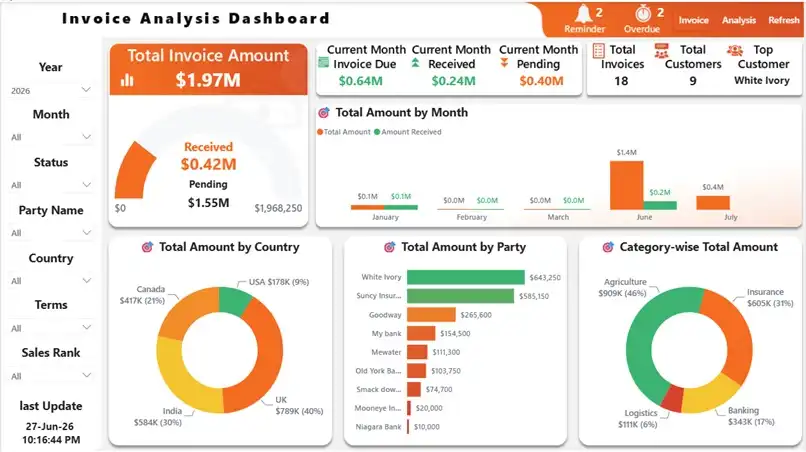
Built for invoice follow-up and collection visibility
Tracinvoice Power BI Invoice Tracking Dashboard
Tracinvoice helps accounts, finance, collection, business owners, and management teams monitor invoice status, received payments, pending collections, 7-day due reminders, overdue notifications, customer-wise outstanding, and average delay days in one professional Power BI dashboard.
No monthly subscription for this dashboard package.
Get the Power BI dashboard with Excel invoice template, demo data, setup guide, documentation, refresh guidance, and basic setup support.
Power BI Dashboard • Excel Invoice Template • Setup Guide • Demo Data
Dashboard access details will be shared by email after successful payment verification.
Note: The dashboard uses sample/demo data for presentation. Buyers must replace demo data with their actual invoice data. Dashboard output depends on data quality and correct format.

Tracinvoice Demo – Power BI Invoice Dashboard Demo
Tracinvoice Demo allows businesses to explore a professional Power BI Invoice Demo created for invoice tracking, payment monitoring and collection analysis. This interactive Invoice Dashboard Demo helps users understand total invoice value, received payments, pending collections, overdue invoices, upcoming payment reminders and customer outstanding balances from one clear dashboard. The Tracinvoice Demo is designed for business owners, finance teams, accountants, collection teams, manufacturers, distributors and service companies that want better control over accounts receivable.
Users can apply filters to analyse invoices by year, month, status, customer, country and category. The dashboard also highlights payment delays, overdue amounts, current-month invoices and customer-wise collection performance. This makes invoice follow-up faster and helps decision-makers identify which customers or invoices need immediate attention.
The Payment Dashboard converts structured Excel invoice data into interactive Power BI reports without requiring businesses to build a dashboard from the beginning. Tracinvoice includes a ready-to-use Power BI dashboard, Excel data template and setup guide. Explore the demo to understand how Tracinvoice can simplify invoice tracking, improve collection visibility, reduce manual reporting and support faster payment decisions.
The Invoice Tracking Dashboard Demo also demonstrates how businesses can reduce dependence on manual spreadsheets and improve the accuracy of collection reporting. By viewing pending invoices, overdue payments, reminder invoices and customer-wise outstanding amounts in one place, finance teams can plan follow-ups more effectively. The Accounts Receivable Dashboard Demo provides a clear picture of payment behaviour and collection delays, helping management take timely action before outstanding balances increase. With interactive filters and simple visual analysis, Tracinvoice makes invoice monitoring easier for both operational teams and decision-makers. This demo helps users evaluate the dashboard experience before purchasing the complete Tracinvoice Power BI package.
We simplify complex business into simple solutions by implementing technology and driving data figures. Our ERP Solutions are able to serve every department and develops efficiency in operation. It would be great to meet and discuss more.
Kalpavriksh software is pioneer in delivering enterprise and customized technical solutions.
- PHP
- NodeJS
- Angular
- React
- Python
- PowerBi
- SQL
- Read-more
